How do you add Lagos Life to your phone?
Use Android Chrome or iPhone Safari to add the official website to your home screen. This is the browser game’s web app, not a separately verified APK. You can also keep playing in your browser without installing anything.
Installation instructions checked October 6, 2026 against Google and Apple documentation. The diagrams below explain the steps; they are not phone screenshots or physical-device tests.
How do you install it on Android?
Use Chrome. Open the game in the full browser rather than inside another app.
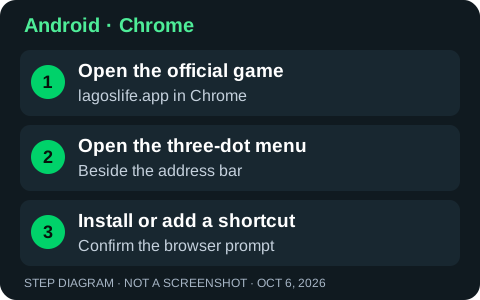
- Open lagoslife.app in Chrome.
- Tap the three-dot menu beside the address bar.
- Choose Install and create shortcut → Install, as described in current Chrome Help. Other versions may show Install app or Add to Home screen.
- Follow the confirmation prompt, then open the new icon from your home screen.
No install option? You can continue using the website. A shortcut may be offered instead; its label and behaviour depend on your browser version.
How do you add it on iPhone?
Use Safari. The Share menu provides the home-screen option.
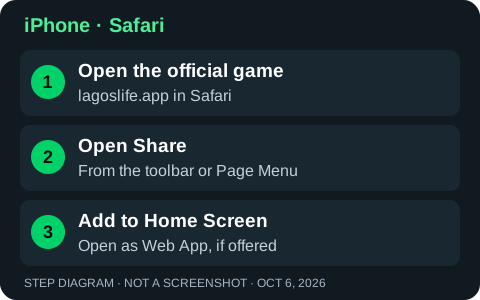
- Open lagoslife.app in Safari.
- Tap Share. Depending on Safari’s layout, open the Page Menu first, then choose Share.
- Scroll through the actions and select Add to Home Screen.
- If offered, turn on Open as Web App, then tap Add. Open the icon from your home screen.
Cannot find Add to Home Screen? Scroll to the bottom of the Share actions, choose Edit Actions and add that action.
Does this work offline? Offline gameplay has not been verified. Keep an internet connection available; adding an icon does not guarantee offline play or an app-store version. Official web-app configuration [source]
Browser instructions: Google Chrome Help [source] · Apple iPhone User Guide [source]. Menu names and placement can vary across versions.
Is there an official Lagos Life APK or app-store download?
We have verified the browser game and its web-app configuration, but not a separate official APK, App Store or Google Play listing. The verified route is the official website at lagoslife.app.
Browser installation adds that website to your home screen. It does not establish that a separately advertised APK or store listing is official. Check the game’s own website for current download links.
Sources
Browser instructions checked October 6, 2026. Steps and diagrams follow official documentation; they are not physical-phone installation tests. The game’s web-app configuration was checked October 5, 2026.
- Official web-app manifest ↗
The standalone home-screen web-app configuration.
- Google Chrome Help: use web apps ↗
Android Chrome installation instructions; checked October 6, 2026.
- Apple iPhone User Guide: turn a website into an app ↗
Safari home-screen installation instructions; checked October 6, 2026.